> For the complete documentation index, see [llms.txt](https://docs.shippify.co/developers/llms.txt). Markdown versions of documentation pages are available by appending `.md` to page URLs; this page is available as [Markdown](https://docs.shippify.co/developers/pt/shippify-api/entregas/imprimir-etiquetas-da-entrega.md).
# Imprimir etiquetas da entrega
Os armazéns costumam imprimir etiquetas para colar em cada pacote antes de despachá-lo. Você pode usar este endpoint para gerar um arquivo PDF com as etiquetas de uma ou várias entregas.
## Impressão de etiquetas
> Imprimir etiquetas para uma ou mais entregas.
```json
{"openapi":"3.0.0","info":{"title":"API Shippify","version":"1.0.0"},"servers":[{"url":"https://api.shippify.co","description":"Servidor de desenvolvimento"}],"security":[{"Basic_Auth":[]}],"components":{"securitySchemes":{"Basic_Auth":{"type":"http","scheme":"basic"}},"schemas":{"Unauthenticated":{"properties":{"code":{"type":"string"},"message":{"type":"string"}},"type":"object"},"printTags":{"request":{"type":"object","required":["deliveryIds"],"properties":{"deliveryIds":{"description":"Identifiers of the delivery for which you want to print the labels. Only this property will go in the payload.","type":"array","items":{"type":"string"}},"referenceIds":{"description":"Reference identifiers of the delivery for which you want to print the labels. Only this property will go in the payload.","type":"array","items":{"type":"string"}}}}}}},"paths":{"/v2/integrations/deliveries/labels":{"post":{"tags":["Entregas"],"summary":"Impressão de etiquetas","description":"Imprimir etiquetas para uma ou mais entregas.","responses":{"200":{"description":"Operação bem-sucedida","content":{"application/pdf":{"schema":{"type":"string","format":"binary"}}}},"401":{"description":"Não autorizado","content":{"application/json":{"schema":{"$ref":"#/components/schemas/Unauthenticated"}}}}},"requestBody":{"description":"","content":{"application/json":{"schema":{"$ref":"#/components/schemas/printTags/request"}}}}}}}}
```
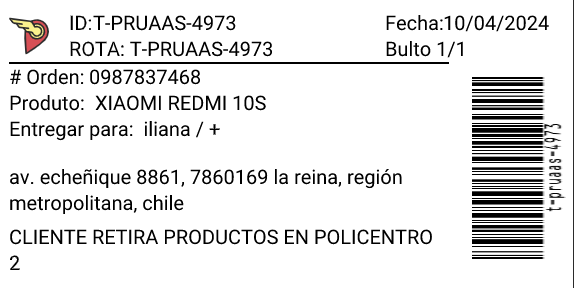
## Exemplo de etiqueta
Etiqueta
## Casos de uso
Imprimir etiquetas por id de entregas
```json
{
"deliveryIds":[
"t-pruaas-4973"
]
}
```
Imprimir etiquetas por id de referência
```json
{
"referenceIds": [
"P-0001"
]
}
```